How do you track your lifelist?

filovirus

Well-Known Member
I love all these "how many have you seen?" threads, but find myself struggling to contribute because I don't currently have a list of every animal I've seen. A few questions, then...
  • What program/software/medium do you keep yours in? Spreadsheet, word doc, paper?
  • How do you organize it? By order, kingdom, zoo, species?
  • What things do you record? Name and binomial name? Captive or non-captive? Zoo where applicable? Date/time? Notable comments?
Very interested in seeing how folks organize things. I'm very envious of some of you guys' lists and really want to start cultivating my own.
 
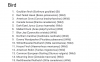
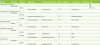
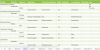
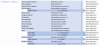
I have a google docs document that I sort by Order for vertebrates, then by Class or Phylum for invertebrate groups. I have a spreadsheet where I list every species in a taxonomic order, along with subspecies and location information. The list is nice to track species in order of seeing them, while the spreadsheet is better for an exact taxonomic sorting and to be able to quickly tally the number of species within any given taxonomic group you've see. This is a bit time consuming, however, and I'm open to moving more towards another listing method.

Life List document:
upload_2025-7-27_10-25-9.png

Life List spreadsheet:
upload_2025-7-27_10-26-23.png


On a related note, how do people sort their photographs? I've been pondering over the best way to do so taxonomically. I've seen people create their own websites, extensive google drive folders, and even Facebook folders. I've been thinking of putting photos into my spreadsheet but as that would take a great amount of time (and potentially storage space if they weren't hosted elsewhere) I haven't gotten around to it yet, and would like to find the best way to do so.
 

Attachments

  • upload_2025-7-27_10-25-9.png
    upload_2025-7-27_10-25-9.png
    123 KB · Views: 125
  • upload_2025-7-27_10-25-47.png
    upload_2025-7-27_10-25-47.png
    235.3 KB · Views: 5
  • upload_2025-7-27_10-26-23.png
    upload_2025-7-27_10-26-23.png
    263.9 KB · Views: 137
I have a google docs document that I sort by Order for vertebrates, then by Class or Phylum for invertebrate groups. I have a spreadsheet where I list every species in a taxonomic order, along with subspecies and location information. The list is nice to track species in order of seeing them, while the spreadsheet is better for an exact taxonomic sorting and to be able to quickly tally the number of species within any given taxonomic group you've see. This is a bit time consuming, however, and I'm open to moving more towards another listing method.

Life List document:
View attachment 811712

Life List spreadsheet:
View attachment 811717


On a related note, how do people sort their photographs? I've been pondering over the best way to do so taxonomically. I've seen people create their own websites, extensive google drive folders, and even Facebook folders. I've been thinking of putting photos into my spreadsheet but as that would take a great amount of time (and potentially storage space if they weren't hosted elsewhere) I haven't gotten around to it yet, and would like to find the best way to do so.

I don't have a life list though I use a Google sheet for the big challenge which has a set of tabs per year, one for locations and dates visited and then a second one for animals seen. I think ebird is helpful for something like list making, if I was looking beyong the annual.

Photo wise I use both Google photos and then a Smug mug site for completed photos (post processed). I save photos into folders by the date they were taken and location and then use tags to search on. Smugmug is a paid service but it has great tagging and you can create them per photo or for a whole album / folder at a time and it's good for sharing etc. Tagging means I can search for animals by whatever means, or animals by location (or riders, owners or horses for eventing) but the overall approach is chronological and location based. I find the tags are better in that than in Google, as Google wants to create it's own searches (understandably I suppose) but Google is of course cheaper.

Describes tagging

https://www.smugmughelp.com/hc/en-u...o-titles-captions-and-keywords#photos-section

Example from my library

smugexample.jpg
 

Attachments

  • smugexample.jpg
    smugexample.jpg
    99.2 KB · Views: 128
I just have a basic Google Spreadsheet, organising the species by order and listing each place I saw a certain animal at next to the name (just the regular names rather than the scientific, because those can get complicated sometimes). I also usually colour code each animal order: orange for mammals, green for reptiles, red for birds, blue for fish, purple for amphibians and yellow for invertebrates.
On one page of the spreadsheet I list each zoo or aquarium I visit, the location, the date of my last visit and the number of species I saw during that visit. I've deleted and re-done the spreadsheet a number of times, often resetting at the beginning of each year, but going forward I'll try to maintain one version of the list for longer.
 
I’ve considered making a thread like this before, because for as many people there are here who clearly do keep a life list, you don’t see people get into their specifics all too often.

Like many others, I use a Google Sheet, with several different worksheets: Carnivorans, Ungulates, Primates, Marsupials, Rodents, Other Mammals, Birds of Prey, Landfowl, Waterfowl, Wading Birds, Shorebirds, Parrots, Passerines, Other Birds, Crocodilians, Lizards, Turtles, Frogs, and Salamanders. Not the most taxonomically uniform breakdown, but it keeps the sheets manageable.

Then on each sheet I’ve got subcategories - these mostly strive for family-level, but I’ve mixed it up in places to keep things less cluttered. No sense in having three subcategories for seals, sea lions, and walrus when I’ve only seen four species total and a single “Pinnipeds” header will do.

I track both common and scientific name, the date first seen (really only applicable to entries added since i started the list), and a checkbox for species seen in the wild or “domestic” settings (pets, pet stores, farms, basically any non-wild and non-zoo setting). Subspecies are inconsistently tracked as indented lines under their species. And then of course, I list each zoo I see the species at as well as the date I first saw them there.

It’s fun to keep track of, and it’s always exciting to add new lifers. I strongly encourage anyone who doesn’t currently keep one, to start.
 
I used a standard google sheets list for quite awhile, and still maintain it as a quick reference. Late last year I scaled up to include a lot more information, took a long time and a lot of digging for information, but very pleased with the result, and excerpt shown below:
Screenshot 2025-07-27 153914.png

Edit: column B is for subspecies listings, and D is for comments on the species.
 

Attachments

  • Screenshot 2025-07-27 153914.png
    Screenshot 2025-07-27 153914.png
    489.7 KB · Views: 123
I used a standard google sheets list for quite awhile, and still maintain it as a quick reference. Late last year I scaled up to include a lot more information, took a long time and a lot of digging for information, but very pleased with the result, and excerpt shown below:
View attachment 811844

Edit: column B is for subspecies listings, and D is for comments on the species.
Very nice, this is sort of what I envision mine to look like in a more finalized format, although it does seem like a ton of work. There is also the issue of ever-changing taxonomy which is a bit of a pain to update in the spreadsheet format.
 
Very nice, this is sort of what I envision mine to look like in a more finalized format, although it does seem like a ton of work. There is also the issue of ever-changing taxonomy which is a bit of a pain to update in the spreadsheet format.

It was a ton of work to get set up like that, took me a couple months working on it a few hours a day. However upkeeping it has been pretty easy, adding species is easy enough and if I need to shunt something around the cut and paste works oddly well. Generally the taxonomy doesn't change in ways that require shunting very much so it's not bad. Reminds me I have a few species I need to get added in.
 
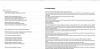
I keep my lifelist as an Excel spreadsheet, with seperate tabs for fishes, birds, herpetiles, mammals and invertebrates. Within each sheet, order and family level taxa are sorted by some semblance of taxonomic order, and species within each family are arranged in alphabetic order of scientific name (except for birds, where I follow the species sequence used by IOC). I note whether each species is seen in the wild or in captivity (in cases where I've seen the species both captive and wild, wild takes precedence), and the location where I first saw the species. Initially setting up this kind of list takes a while, but after that adding new species is quick and easy.

For an idea of layout. C and W mean captive and wild respectively, and darker-coloured entries are subspecies (scientific names for subspecies are in a seperate column so I can have a counter running for number of species that won't count subspecies).
upload_2025-7-28_14-46-51.png

I would like to include images I've taken to this list, but I can't think of an elegant way to include them in the current layout.
 

Attachments

  • upload_2025-7-28_14-46-51.png
    upload_2025-7-28_14-46-51.png
    391.2 KB · Views: 126
I keep my lifelist as an Excel spreadsheet, with seperate tabs for fishes, birds, herpetiles, mammals and invertebrates. Within each sheet, order and family level taxa are sorted by some semblance of taxonomic order, and species within each family are arranged in alphabetic order of scientific name (except for birds, where I follow the species sequence used by IOC). I

I second this until the end of the quote. I only add the information when i first saw the species and if i have a picture of the species (with three subcategories, "good", "bad" and "no")

Species - Scientific name - Family - Order - First seen - Picture
Dunkelsäger - Mergus octosetaceus -Entenvögel - Gänsevögel - 21.9.24 -G

For pictures i have theme once sorted by zoo and a second time sorted by species. There the path would look like:
Birds/Gänsevögel/Entenvögel/Dunkelsäger

If possible i use the generic names, but the path has to be exactly the same as at the excel sheet, so that the scientific name is traceable.
 
Hello.

I just use the notepad on my laptop (+ Samsung Notes during my zoo trips). On my lifelist, I record their binominal names, as well as the zoo and the year the species were seen. Only a few subspecies, like the Western lowland gorilla, make it to the count because most zoos I have visited since 2021 (with the exception of the three I visited in Europe this year) don't really care to name the subspecies they hold.

My camera, which is over ten years old, doesn't handle poor lightning very well, so I have many species unphotographed or with blurry pictures. Therefore, I don't really use the photographs I take as evidence, just the notes I take with my phone [basically, I write down their popular or scientific names (it depends on how much of a hurry I'm in) and add an "X" next to them if they were not seen].

When I take notes on my phone, I also skip a line everytime I write down the taxa held in a new enclosure. So, if were in an African Savanna section of a zoo and which had a lion exhibit followed by a mixed species paddock (whose grey crowned cranes were signed, but not seen), I'd type:

"Panthera leo (bleyenberghi)"

(line skipped)

"Equus quagga (burchellii)
Connochaetes taurinus (taurinus)
Balearica regulorum X".
 
Last edited:
Building and keeping track of a life list is really fun IMO :) it's not for everyone, but if you are a numbers/data person, or want to better remember every cool thing you see, or (as is especially true for me) you use gaps as a motivation to get out and see new places and look for new creatures - a life list is a great way to scratch those itches.

I keep my lifelist as an Excel spreadsheet, with seperate tabs for fishes, birds, herpetiles, mammals and invertebrates. Within each sheet, order and family level taxa are sorted by some semblance of taxonomic order, and species within each family are arranged in alphabetic order of scientific name

This is exactly my method too - Excel spreadsheet, separate tab for each class, animals sorted by order and family within each tab, and species listed in alphabetic order by Latin name. I also have columns with my species totals - for family, order and class.

I have a column where I list every single zoo where I know I saw that species, and then additionally a column with the total number of zoos. I don't organize by individual visits - mainly because there are a few zoos that I've been local to and couldn't begin to count how many times I saw something there.

For anyone starting a life list, I can't recommend enough using a spreadsheet program like Excel or Google Sheets - they are designed for large amounts of information like this, and it's very easy to add or delete entries as well as adding up totals. I use Word documents more for straight one-time lists, like my annual bird count or species lists for individual zoos.

and a checkbox for species seen in the wild or “domestic” settings (pets, pet stores, farms, basically any non-wild and non-zoo setting).

I keep separate spreadsheets for captive and wild species I've seen, but I do use color-coding in my spreadsheets to show where there is overlap. For my wild life list, I also keep track of each year I see or don't see a species.

Subspecies are inconsistently tracked as indented lines under their species.

Subspecies is one thing I haven't made much of an effort to track. When I do happen to know subspecies information, I will usually just add it as a note into the column where I track each zoo - Red Pandas for example:

Blank Park, Charles Paddock, Knoxville, Oklahoma City, Philadelphia, Sacramento, Scovill, St Louis (Nepalese); Asheville NC, Greensboro, Nashville, San Diego Zoo (Chinese); Memphis (unknown)

The other issue I have is that, at a certain point, there are too many columns to easily view everything without having to side-scroll.

It was a ton of work to get set up like that, took me a couple months working on it a few hours a day.

And this is why I have not sorted my photographs by species at all :p I made an attempt and abandoned it within a couple days as I realized the sheer number of photos I would have to sort through.
 
I have a google docs document that I sort by Order for vertebrates, then by Class or Phylum for invertebrate groups. I have a spreadsheet where I list every species in a taxonomic order, along with subspecies and location information. The list is nice to track species in order of seeing them, while the spreadsheet is better for an exact taxonomic sorting and to be able to quickly tally the number of species within any given taxonomic group you've see. This is a bit time consuming, however, and I'm open to moving more towards another listing method.

Life List document:
View attachment 811712

Life List spreadsheet:
View attachment 811717


On a related note, how do people sort their photographs? I've been pondering over the best way to do so taxonomically. I've seen people create their own websites, extensive google drive folders, and even Facebook folders. I've been thinking of putting photos into my spreadsheet but as that would take a great amount of time (and potentially storage space if they weren't hosted elsewhere) I haven't gotten around to it yet, and would like to find the best way to do so.

I ended up copying your sheet pretty much wholesale so thank you! and a big thank you to everyone else of course for their tips and thoughts
 
interesting to see these ,i wanted to do the same but had no idea where to start.
if i do one its gonna take some reserch since i havn't kept track so i'll be missing some unless i can find zoo records from times i visted (im probs gonna not include anything from when i was a kid) but even then, there will be animals zoo's had but i didn't see
 
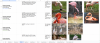
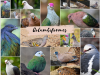
I keep track on Word after many years of modifying tables. I keep a life list that combines captive and wild sightings together. I also include any species seen in the private trade as well with the following format. Species nameWild. Pet Trade (year first seen). Zoo 1 (year first seen), Zoo 2 (year first seen). I include any notable subspecies within the holdings. For each order I tend to create a title page to segment each of the lists and I use my favourite photos for each. Every five years I print and bind it up into a book. My mission every five years is to use photos exclusively from that time period.

upload_2025-8-14_18-48-31.png upload_2025-8-14_18-48-53.png
 

Attachments

  • upload_2025-8-14_18-48-31.png
    upload_2025-8-14_18-48-31.png
    1.6 MB · Views: 70
  • upload_2025-8-14_18-48-53.png
    upload_2025-8-14_18-48-53.png
    146.9 KB · Views: 71
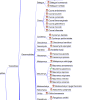
I use a software called Freeplane:

upload_2025-8-15_14-37-37.png

And Excel as well. Have separate Excel spreadsheets for wild and captive, and then one big Freeplane doc with them all bundled together, and icons to denote wild/captive/both. Think it works quite well.

Edit: Ironically the screenshot is a bad example of my normal format as I normally have subspecies as a further branch from the species, but hey.
 

Attachments

  • upload_2025-8-15_14-37-37.png
    upload_2025-8-15_14-37-37.png
    182 KB · Views: 59
Last edited:
I use google slides, I have been told that sheets is just better. However, the reason I use slides is because I like to put my photographs next to the names of species, the whole fun of a lifelist to me is not just seeing all that Earth has to offer but also prove I’ve seen it. Many times before I started a photographic lifelist I would genuinely forget animals I’ve seen (and still am forgetting some).
 
Back
Top