Welcome to the new ZooChat

As for photo storage space, I am surprised that you now allow very large images. It says pixels must be no larger than (rounding down to even numbers) 2000x3000 pixels. This is huge and seems unnecessary. Just my opinion.

Just as a follow up on this, I've changed the default setting to 1920x1080 for regular members and it's now 3840x2160 for premium members.

Any photos larger than this will automatically be scaled down anyway - so it won't really have an impact on users.
 
Is there a way to see what new comments have been made in the gallery? I have been browsing through hundreds of photos but do I have to look at every single photo to see if there are any new comments? Is there going to be a separate section set up (like before) where new comments were singled out?

Yes, this is a pain and I'm not happy about how this works :(

I've made some requests to the developers to include this functionality - but there's no guarantees there.

I will need to spend some time building my own functionality here I feel - but that's going to take a while.

Also, is there any way to tell what zoo is represented in a photo or do I have to hover over every single photo? For example, a close-up view of a sloth bear is great but do I have to either hover over the photo or click on it to find out what zoo the bear is at?

Yes, I've noticed that - it's trying to find a balance between showing information versus having a clean and uncluttered interface.

I think the zoo (category) a photo is in should be displayed without needing to hover so I'll see if I can tweak that.

Lastly, have all the comments been discounted from the overall posts of long-time members? Do gallery comments no longer count as posts? That would be a shame.

Yes, because of the change in the way photos manage comments, they are now completely separate to regular forum posts.

I much prefer the old way we did things, but it would have taken me weeks of work to reproduce that functionality on the new system so I had to compromise and move to the new comment based system.

What I will do, however, is to change things so that it counts both posts and comments in user post counts.
 
For now I've disabled the quotas - I will need to investigate the best way to manage this.

Cheers :) I can now continue the process of deleting my old attachments and replacing them with gallery shots!
 
Just a quick question of a fairly unimportant feature, but is there a way to subscribe to threads without posting in them?
In the old ZooChat there was a button for 'thread tools' at the top that allowed you to subscribe to a thread, but I can't see one in the new forum.

Yes, this is what you are looking for:

2016-10-23_11-06-22.png
 
First of all, much thanks to Sim for a huge amount of work and any issues that we raise are not complaints. Only a couple of us are paid subscribers so this site is obviously a labor of love and not a money maker. With that said here are a couple observations.

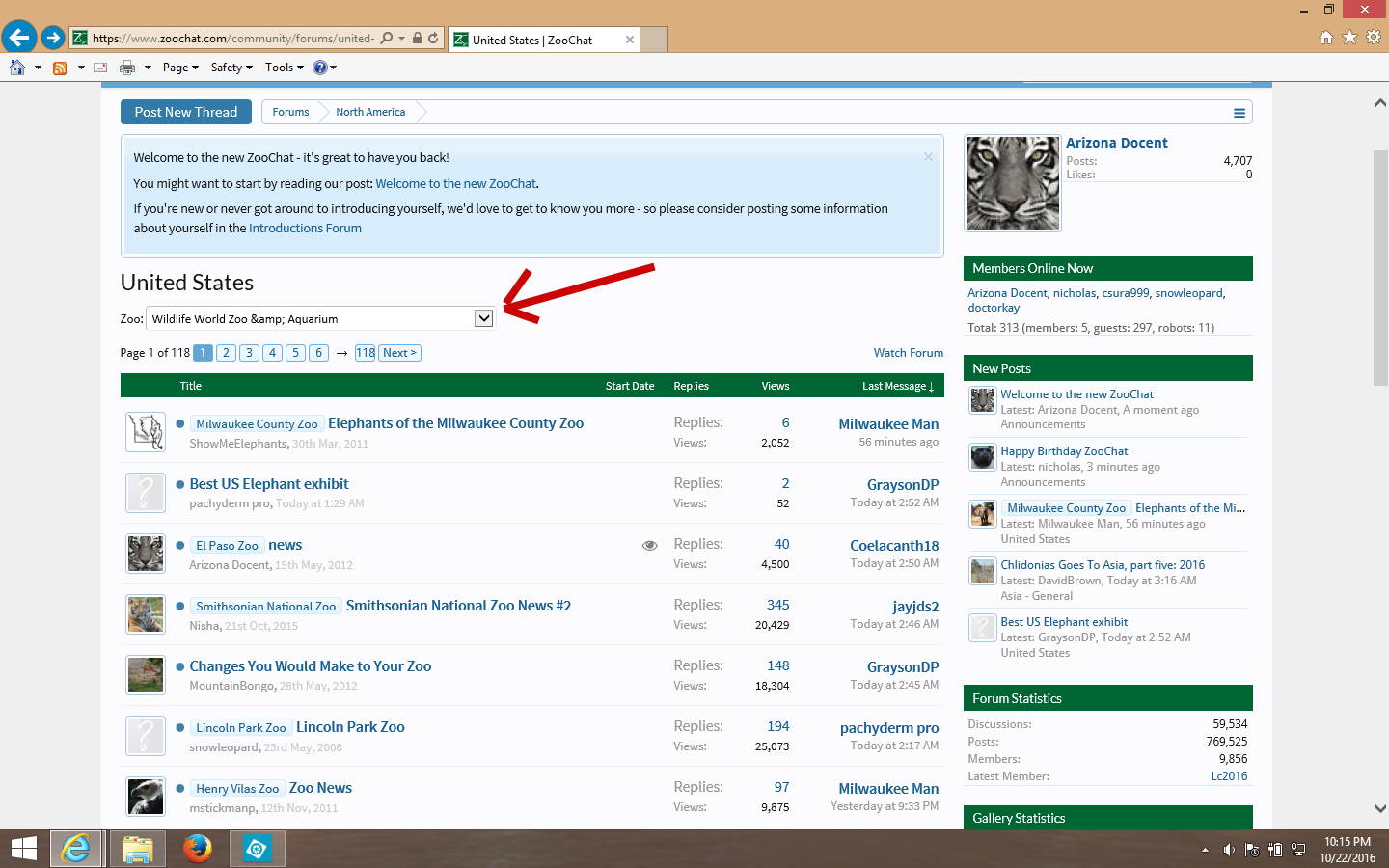
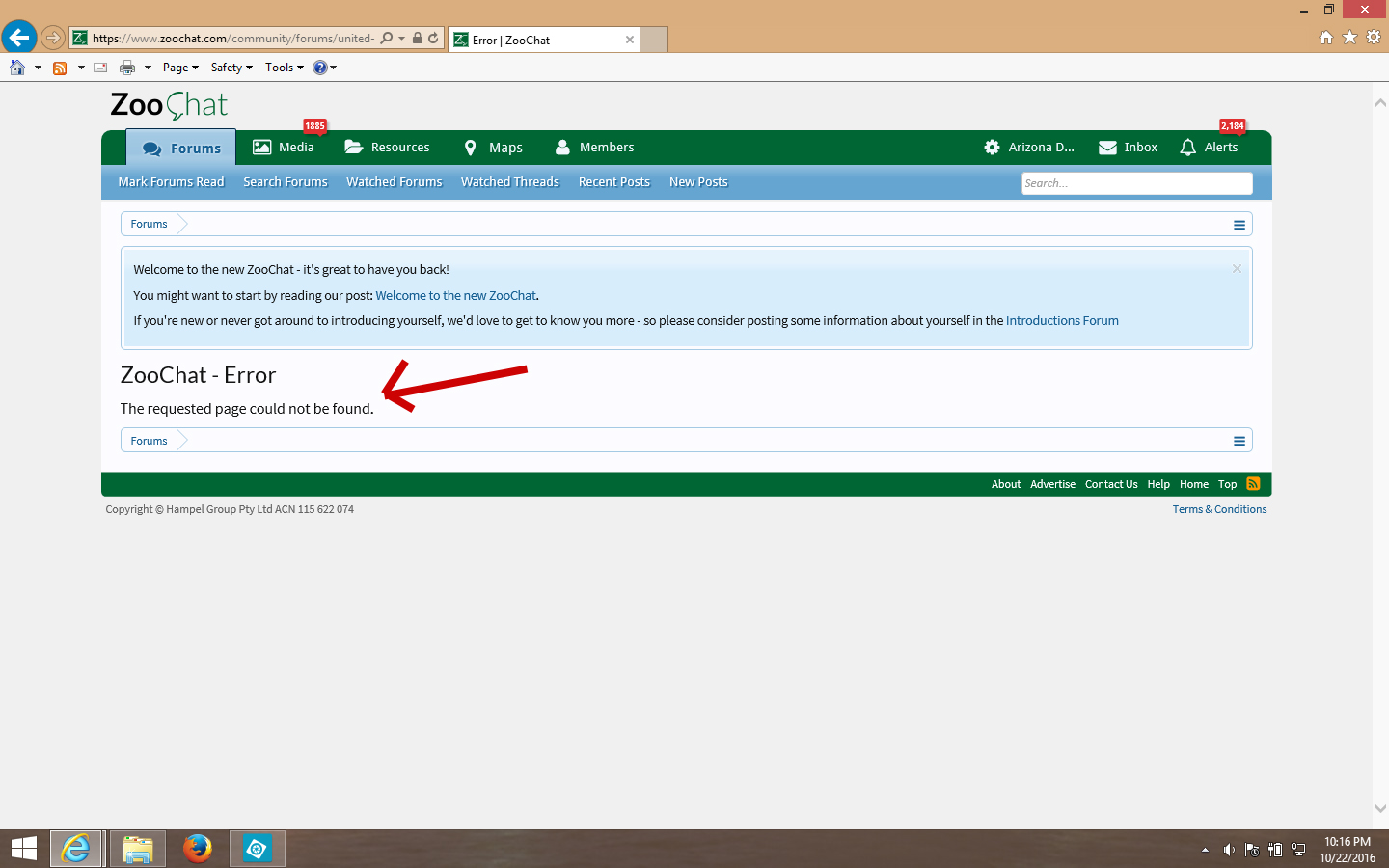
Just now, I could NOT access a zoo discussion thread by going to that zoo (from the country list) and selecting it. It gave an error message something like "thread not found."

Also I notice photos in the gallery remain in the order they were uploaded regardless of comments. On the old site a photo with a new comment would move to the top of the gallery page. Now it stays buried wherever it is. If we could return to the old way of photos appearing in order of most recent comment, that would be great.
 
OOOPS - I found out there is a way to have the photos in a gallery appear in comment order. Once in that zoo's photo gallery, there is a small text on the top right of the photos that says "sort by" with a drop down area. The default is "date" but you can change it to "comments" (plus a couple other options).
 
Is there a way to move between threads within a forum without going back to the forum and clicking on the next thread? In old ZooChat, you used to have options at the bottom to move to the next or previous threads, which was very useful for reading through a forum.
 
Is there a way to move between threads within a forum without going back to the forum and clicking on the next thread? In old ZooChat, you used to have options at the bottom to move to the next or previous threads, which was very useful for reading through a forum.

No, I don't believe there is that option.

You could open each thread in a new tab so you don't lose your place in the forum?
 
OOOPS - I found out there is a way to have the photos in a gallery appear in comment order. Once in that zoo's photo gallery, there is a small text on the top right of the photos that says "sort by" with a drop down area. The default is "date" but you can change it to "comments" (plus a couple other options).

Yes, although that is showing you photos (uploaded in the past 30 days) with the MOST comments, not the most recent comments - so it still won't do what you want.
 
As for links about not being able to go to a zoo discussion forum, I tried Wildlife World Zoo (in USA) and then tried the one directly above it - Wildlife West - and got the same thing.
 
I appreciate all of your time and effort on this site Sim, and as you know I've been a regular contributor to ZooChat for almost a full decade now (Dec. 2007). I generally like the recent changes, although they are obviously taking a while to figure out, but is there no way for photos with comments to be somehow highlighted? Maybe with a red flag or different-coloured border? I know that in the past there have been weekends with perhaps 400 new photos uploaded to the site and some of the more interesting conversations have been around photos. Would I now have to check all 400 photos to see which ones have been commented on? Yikes! A lot of the general zoo information in the forums is easily accessed via Google, but the comments on photos are priceless and now it is incredibly time-consuming for an individual to go through each and every photo. I'm not sure that anyone has the time for that.
 
Well I see I do not know yet how to embed photos, I did copy and paste but that just put a hotlink. I see now there is a camera icon on the top bar above where I am typing, so let me try it again.

Step one, pick a zoo:

Step two, instead of going to zoo threads it goes to this error:
 
Thanks - screenshots help (suggestion for next time though - save them as PNG files and you can attach them to your post directly - this only applies to things like screenshots though, not photos).

I've found the problem (I tried it in Microsoft Edge and it's getting the wrong URL - works fine in Chrome).

I'll try and find a fix for it.

In the meantime, you can work around it - click the Thread Display Options at the bottom of the thread list ...

2016-10-21_19-32-21.png

... you can also click on an existing thread (zoo) prefix to show only threads belonging to that zoo:

2016-10-21_19-36-44.png
 
I appreciate all of your time and effort on this site Sim, and as you know I've been a regular contributor to ZooChat for almost a full decade now (Dec. 2007). I generally like the recent changes, although they are obviously taking a while to figure out, but is there no way for photos with comments to be somehow highlighted? Maybe with a red flag or different-coloured border? I know that in the past there have been weekends with perhaps 400 new photos uploaded to the site and some of the more interesting conversations have been around photos. Would I now have to check all 400 photos to see which ones have been commented on? Yikes! A lot of the general zoo information in the forums is easily accessed via Google, but the comments on photos are priceless and now it is incredibly time-consuming for an individual to go through each and every photo. I'm not sure that anyone has the time for that.

Yes, already discussed multiple times - I do understand it's less than ideal right now and will try and develop a solution to make new comments easy to find.
 
Yes, already discussed multiple times - I do understand it's less than ideal right now and will try and develop a solution to make new comments easy to find.
First of all, thank you Sim for all of your hard work in updating the website. It looks a great deal fresher and will, I am sure "make sense" in time (I say this as someone who spends the first fortnight after every iTunes update cursing, hunting for my carefully curated playlists of 1950s country music, before realising all is okay really).

I would concur with the many who lament the inability to check new comments in the gallery; this is a significant drawback, so it is pleasing to hear you hope to resolve it. In the meantime, a partial solution is to utilise the "recent activity" tab (if that is the right term). This provides a list of all comments and posts (but can get clogged up if someone has posted hundreds of photos from their latest visit somewhere....).

...speaking of which, I think a photo upload ration (as discussed above) is a good idea, if it forces users to be more discerning about the pictures they post.

Thanks again Sim!
 
I would concur with the many who lament the inability to check new comments in the gallery; this is a significant drawback, so it is pleasing to hear you hope to resolve it. In the meantime, a partial solution is to utilise the "recent activity" tab (if that is the right term). This provides a list of all comments and posts (but can get clogged up if someone has posted hundreds of photos from their latest visit somewhere....).

Thanks sooty - I hadn't found that option yet - that's much better!
 
I'm currently unable to upload photographs... I have selected the gallery (ZSL Whipsnade Zoo) and the content I wish to upload, it loads the first one I select, saying it is 100% complete but then stops, the bit to the left of it doesn't show the photograph at all. o_O

EDIT: I have since tried this on my tablet (I didn't actually upload anything fully, as I don't have the photos on it), and using a random picture it seemed to work, but differently to on my computer (with a black box appearing), it got me to the stage of adding a description and titles.

I have since tried doing this on Internet Explorer (or whatever it is called now) instead of Google Chrome and that worked, so I can still upload photographs, I just have to use an unpleasant browser. :p
 
Back
Top